End-to-End Data Flows
The following flows show where a document originates, when AECloud accepts responsibility for processing, and where the final outcome must be checked.
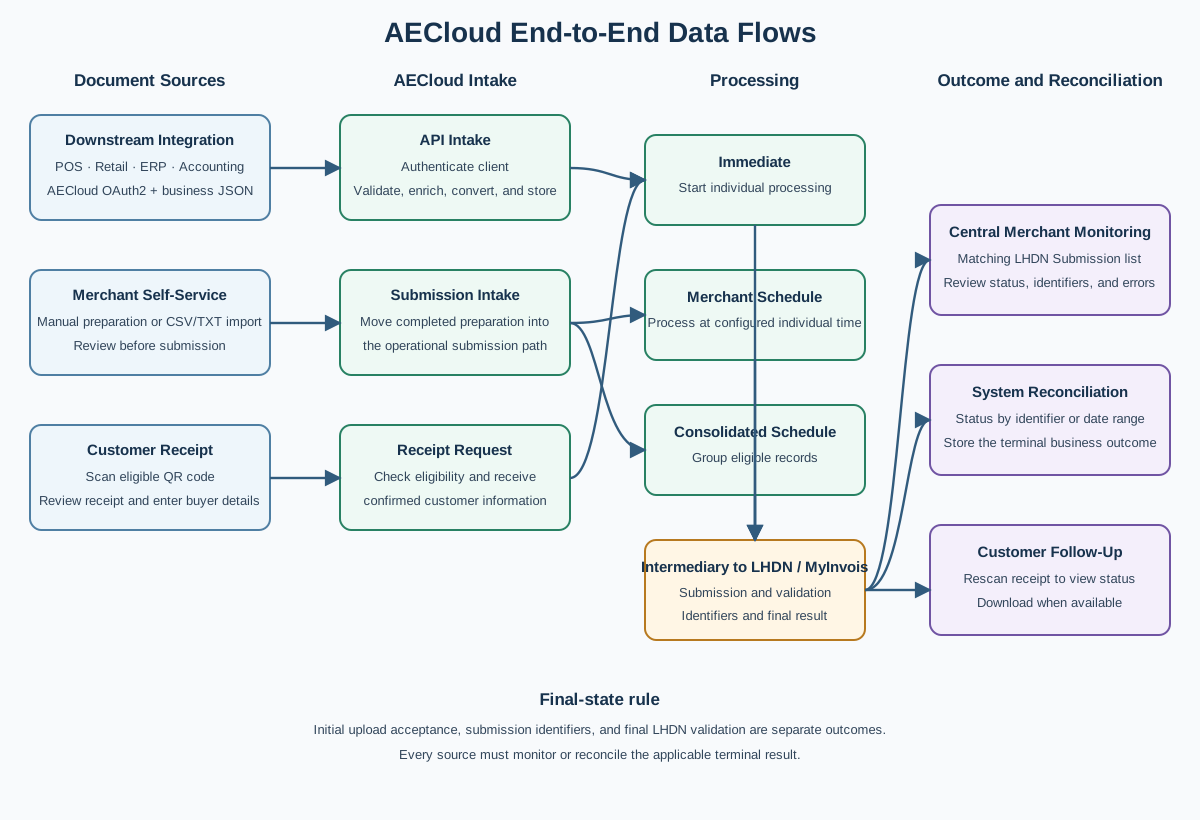
Immediate downstream-system flow
- The downstream system collects and validates its source transaction.
- It obtains or reuses a valid OAuth2 access token.
- It sends the document JSON to the matching submission endpoint with immediate processing requested.
- AECloud authenticates the client, resolves the merchant and outlet, validates the request structure, and stores the document.
- When LHDN submission is enabled, AECloud enriches the business data using the approved merchant configuration and prepares the applicable MyInvois document structure.
- AECloud authenticates separately to MyInvois as an intermediary acting on behalf of the authorized taxpayer and starts submission processing.
- AECloud returns the available business result and identifiers.
- The downstream system stores the identifiers and checks status using the matching document-family endpoint.
- Authorized merchant users can review the document in the matching LHDN Submission list, together with activity received from their other connected outlets.
- Monitoring continues until a terminal result such as Valid, Invalid, Error, Voided, or Cancelled is recorded.
An HTTP success response or initial AECloud success message does not replace final status reconciliation.
Scheduled downstream-system flow
- The downstream system sends a document using the merchant-setting mode.
- AECloud validates and stores the document for the next configured individual submission time.
- AECloud returns the initial result before final LHDN processing has occurred.
- Scheduled processing selects the eligible record at the applicable time.
- AECloud prepares and sends the document to MyInvois.
- AECloud records the submission identifiers and later validation result.
- The downstream system polls responsibly or performs submission-range reconciliation.
- The merchant reviews the corresponding LHDN Submission list when operational investigation is required.
The integration should use increasing polling intervals for long-running or scheduled records and stop active polling after a terminal state.
Consolidated downstream-system flow
- The downstream system sends an eligible record using the approved consolidated mode.
- AECloud validates and stores the record for the merchant's configured consolidated schedule.
- Scheduled processing selects and groups eligible records.
- AECloud prepares the consolidated e-Invoice and communicates with MyInvois.
- AECloud records the resulting consolidated processing information.
- The merchant and integration operator reconcile the outcome according to the agreed consolidated workflow.
Do not expect each source receipt to receive the same individual identifiers or lifecycle actions as an individually submitted e-Invoice.
Manual Self-Service flow
- The merchant prepares settings and the required product, customer, or supplier master records.
- The merchant creates the correct document type under Self-Service.
- The merchant completes and reviews the header, party information, lines, taxes, references, and totals.
- The merchant uses the document-specific submission action.
- AECloud creates or updates the operational record under the matching LHDN Submission document family.
- Processing follows the selected immediate or scheduled path.
- The merchant monitors status and reviews errors in LHDN Submission.
- If correction is permitted, the merchant corrects the source draft or master data and follows the controlled resubmission action.
Self-Service preparation and LHDN Submission monitoring are separate stages and separate workspaces.
Bulk-import flow
- The merchant downloads the current template for the selected Self-Service document type.
- The merchant prepares a CSV or TXT file and keeps document numbers unique.
- The merchant uploads the file and runs Validate Data.
- Invalid rows are corrected in the source file and validated again.
- The merchant selects Import Now only after reviewing the validation result.
- AECloud imports eligible rows; depending on each row and merchant configuration, background submission processing can also be queued.
- The merchant checks the import result, the Self-Service list, and the matching LHDN Submission list.
Import completion is not proof of final LHDN validation.
Customer receipt QR-code flow
- The merchant's receipt provides a QR code linked to the eligible sale.
- The customer scans the QR code and opens the Customer Console.
- AECloud checks the receipt and displays the permitted action for its current state.
- The customer verifies the receipt details and enters the required buyer information.
- The customer reviews and submits the request once.
- AECloud processes the individual e-Invoice request and records the result against the receipt-related sale.
- The customer rescans the same QR code to use View Status.
- When available, the customer downloads the generated e-Invoice.
The customer should contact the merchant when the receipt, purchased items, or amounts are incorrect. Repeated submission attempts should not be used to resolve a source-data problem.
Adjustment-document flow
Credit notes, debit notes, and refund notes follow their own standard or self-billed document family.
- Identify the correct original invoice and the business reason for the adjustment.
- Create the adjustment in the authoritative source: the downstream system or Self-Service.
- Include the required original-document reference and the correct customer or supplier context.
- Submit through the matching adjustment endpoint or Self-Service action.
- Monitor the matching LHDN Submission list or API status endpoint.
- Reconcile the final result with the original document and the merchant's accounting records.
An adjustment is not the same as voiding an unsubmitted AECloud record or cancelling an eligible validated e-Invoice.